
Who is Gawx Art?

Gawx is a Mexican YouTuber, illustrator, and filmmaker known for creating highly cinematic art videos that combine drawing, storytelling, and professional-level video production.

He became popular on YouTube by turning the process of making art into cinematic short films, using creative camera work, editing, and storytelling rather than simple art tutorials.
 

Key Techniques

  • Cinematic Depth & Backlighting: Gawx frequently lights his scenes for depth – often placing a strong light behind or to the side of the subject, creating pronounced backlit silhouettes and light beams. For example, an early scene in his videos may show dust or haze illuminated by a spotlight, producing visible light rays. In editing, he reinforces this with fog/mist overlays or lens-flare effects. A Motion Array tutorial notes that adding haze (via a fog machine or digital overlay) is key: “a hazy look results in the stunning light rays frequently seen in Gawx Art videos”. These depth-adding effects (sometimes implemented with a “Sunbeams” filter or glow layer) make otherwise plain footage feel cinematic and immersive. In practice, you’d layer a semi-transparent mist clip or use a volumetric light effect over your footage to mimic Gawx’s look


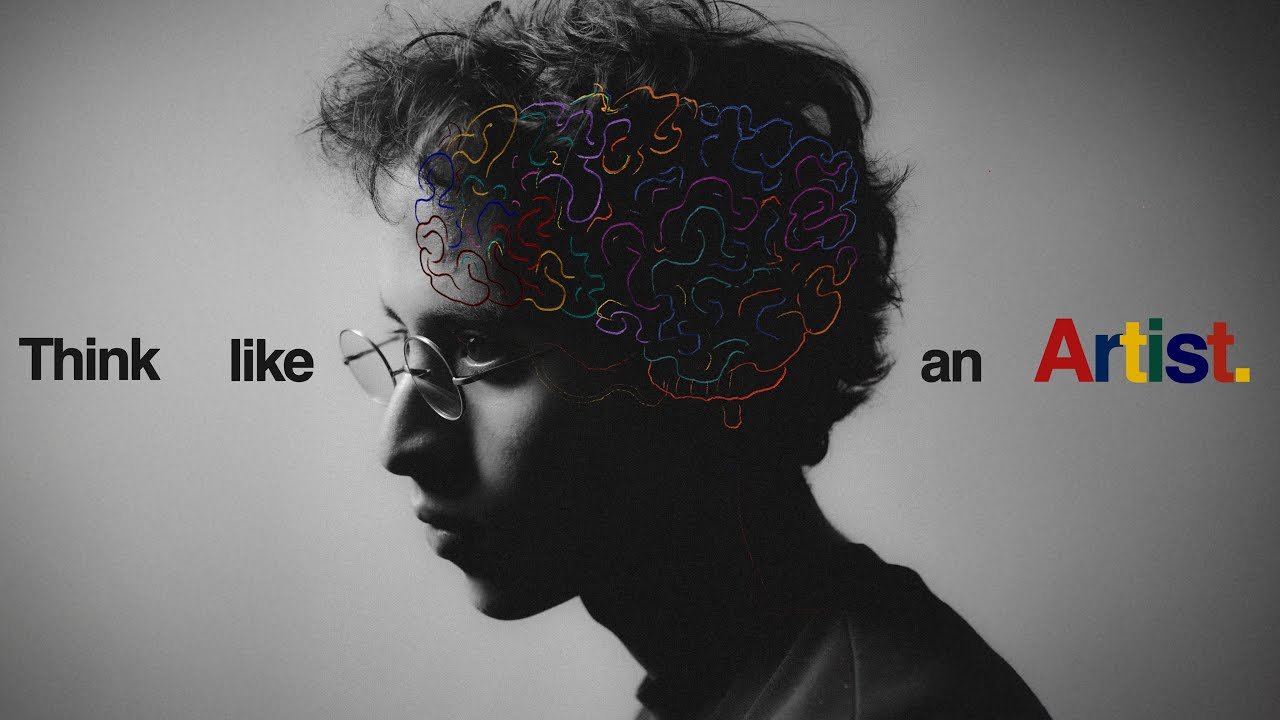
  • Color Grading & Filmic Look: The color palette in Gawx’s videos is highly stylized. He uses tone curves to crush true blacks and whites, yielding a soft, “milky” contrast (no pitch-black or pure-white areas). As one analysis observes, Gawx’s videos have “very little black or white in any shot” – blacks are lifted, whites are dimmed, giving scenes a warm, cinematic roll-off. Practically, this means applying a log-like grade or a custom LUT: raise the shadows and slightly lower the highlights in your color wheels or curve. Footage often leans toward rich, warm midtones and gentle contrast. He also overlays film grain on top (either via a plugin or a noise layer) to recreate the texture of old movie film. For example, one common shot is his face lit by colored lights (see image above), with a visible grain and desaturated shadow – exactly the “retro” film look noted by fans.


  • Whip-Pans and Creative Transitions: Fast, physical camera moves and cuts are hallmarks of his pacing. Gawx often ends one shot with a quick whip-pan or push-in, then cuts to the next scene in the same motion. These smear/blur transitions make the edit feel seamless and high-energy. For instance, he might whip the camera to the right and land on a new location mid-motion. The Motion Array article explicitly describes Gawx’s style as a mix of “fast cuts with whip-pans from his constantly moving footage”. He also uses clever match-cuts: for example, one scene might end with him holding an object in view, and the next begins with a similar object but in a different context, cutting on the object’s motion. Fans have pointed out his “original transitions” as a key trait. To replicate this, use directional blur or quick zoom transitions in your editor, and align your next clip so that motion matches. You might animate a blur from left to right on the cut, or overlay a brief white flash during the whip for impact. These give Gawx-style excitement to scene changes.


  • Sound Design (Foley & Audio Cues): An essential (often hidden) layer of Gawx’s style is meticulous sound design. Almost every action on screen has a matching sound effect: pen strokes have a scribble, camera slide has a whoosh, a page turn has a flip. Motion Array notes that “every movement or action has an accompanying sound effect” in his videos. This includes subtle cues (a pen tap or scribble during drawing) and emphatic ones (a doorbell chime or whoosh at a cut). For example, when Gawx flips pages or draws a line, you’ll hear crisp brush or scribble sounds punctuating each frame. These SFX keep the edit punchy and immersive. (Fans on Reddit remarked: “lots of SFX on everything”.) To do this yourself, record or collect Foley for all key actions and lay them on separate tracks, adjusting volume so they subtly accent the motion. Automate audio ducking so that music softens when a voice or sound effect is foregrounded.


  • Music & Pacing: Music choice is central to Gawx’s brand. He favors classical and jazz-inflected tracks (e.g. Mozart, Beethoven or big-band/electro-funk), which give a “timeless” or energetic vibe. A Motion Array tutorial sums it up: his music is “often orchestral and jazzy, giving the content an upbeat and emotive pace”. This means edits tend to sync to musical beats – e.g., cuts or motion hits on drumbeats or orchestral stings. In practice, he will experiment with different music choices (even spending days to find the right track) and often credits the song in the video. To mimic this, pick royalty-free or public-domain music (many classical pieces are public domain) and edit your cuts to match its rhythm. Consider raising the music’s energy for reveals and mellowing it for close-ups. Consistency in musical style (always some orchestral/jazzy flavor) also helps brand the videos.


  • Storytelling & Humor: Beyond pure editing tricks, Gawx injects personality. He uses catchphrases (“So today…!” in a distinctive falsetto) and playful on-screen moments to keep viewers entertained. Scenes may include a second “Gawx” appearing (the famous two-Gawx transition) or a humorous mini-story (like tripping over a mess and then revealing a Roomba sponsor without it feeling jarring). These creative elements ensure the edit isn’t just a dry how-to – they engage viewers. For example, one video famously changes from black-and-white to color right when a robot vacuum saves the day, integrating a sponsor into the narrative. As one fan notes, his transitions and gags keep you guessing “what comes next”. In your edit, weave visual jokes or unexpected cuts into the sequence, and structure the story so that every part (even sponsor messages) feels like a natural beat, not an interruption.


  • Software, Plugins & Timeline Structure: Gawx’s workflow likely uses professional NLE tools (Premiere Pro, DaVinci Resolve, or Final Cut Pro). He layers multiple video tracks: a base layer for the camera footage, above that adjustment/overlay layers for effects (haze, sunbeams, film grain), plus title/text layers. For example, to get the hazy look you can stack a semi-transparent clip of moving mist (blend mode: Screen or Overlay) atop the base. Motion Array suggests Final Cut’s “Sunbeams” effect for enhanced light rays, but similar glow filters or lens-flare plugins work in any editor. He also likely uses LUTs or color presets: Motion Array even offers “Neon” color grades inspired by Gawx. For transitions, either use built-in presets (whip-pan blur, zoom) or keyframe motion blur manually. Audio is multi-layered too: one track for the music bed, a track (or more) for ambient/SFX, plus narration or sound effects on top. Common editing settings would include easing (some moves might use ease-in/out curves, e.g. a slider shot slowing down), and audio ducking levels (e.g. lower the music by ~10–15 dB whenever voice or a big SFX plays). Experiment with speed changes (ramping between 120 fps slow-motion and 24 fps normal speed) to add energy.

    Example Timeline Structure (layers):
  • Video Track 1: Primary footage (locked color grade).
  • Video Track 2: Adjustment layer (global color LUT or tone-curve tweak, milky blacks).
  • Video Track 3: Overlays (mist, lens flares, light leaks).
  • Video Track 4: Graphics/text (titles, lower-thirds, UI animations like a “line drawing” effect).
  • Audio Track 1: Music (set at 0 dB peak).
  • Audio Track 2: Voiceover or narration (duck music by ~15 dB when present).
  • Audio Track 3+: Sound effects (synchronized with actions; adjust levels to taste).


  • Legal & Ethical (Assets & Fair Use): When replicating Gawx’s style, be mindful of copyright. Gawx himself uses mostly original art and public-domain/classical music (so no license issues). If you use sound effects or music, pick royalty-free libraries or ensure proper licensing (Motion Array’s SFX library, Artlist, or YouTube’s Audio Library, for example). Always credit tracks as needed. For any visuals or art: use your own illustrations or licensed assets; do not copy someone else’s artwork without permission. If reacting or analyzing copyrighted content (like the videos above), rely on fair use (add commentary, keep clips short, transform the content). When incorporating game or movie footage, either avoid it or ensure it falls under fair use commentary/critique. In short, only use assets (audio, video, graphics) that you have rights to, and be transparent about sources.


Conclusion

Gawx Art shows that great videos aren’t just edited — they’re crafted like films. By combining storytelling, cinematic lighting, creative transitions, music, and detailed sound design, he turns simple art videos into immersive visual experiences.

The real lesson is simple: don’t just edit clips — design the experience. When creativity, storytelling, and filmmaking come together, even the simplest idea can become something truly cinematic and inspiring. 🎬